FiBrEye: live anatomy detection for endoscopy cameras
A wired endoscope camera streams video into an Android app. A model running on the device recognises anatomical landmarks in the live feed and draws a labelled box around each one. We built the Flutter app, a Windows labelling tool, and the AWS backend that stores the detection data.
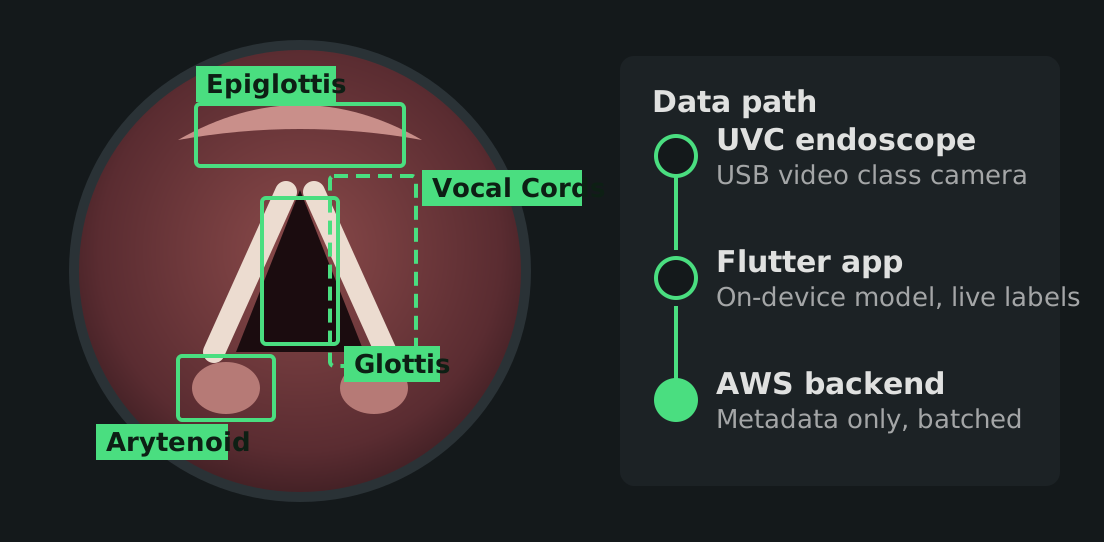
Illustration of the detection overlay and data path, not a product screenshot.
- Industry
- Healthcare, endoscopy
- Platforms
- Android (Flutter), Windows desktop, web dashboard
- Our scope
- Mobile app, desktop tool, cloud backend, admin dashboard
- Labels detected
- 6 anatomical landmark types
What made it hard
Four constraints shaped the architecture of the app and its backend.
Flutter has no built-in USB camera support
The endoscope is a UVC (USB video class) device. The app needs a native Android layer that handles USB permission, attach and detach events, and hands frames to Flutter as a live texture.
Detection has to keep up with live video
The model runs on the phone, so the labels never wait on a network round trip. Each detection is drawn as a box over the camera feed while the clinician is looking at it.
Clinicians should not manage accounts
There are no usernames or passwords. Each device gets an identity from AWS Cognito guest access, and a QR code pairs a second device, such as a Windows PC, to the same user.
Medical data needs a paper trail
Data is encrypted at rest and in transit, every API call is logged, each function gets least-privilege access, and detection records expire after 90 days.
What we built
The system has four parts. They all work from the same set of detection labels:
- Arytenoid
- Epiglottis
- Esophagus
- Glottis
- Tracheal rings
- Vocal cords
Flutter app for Android
Live UVC camera feed inside a Flutter widget, camera controls such as brightness, contrast and exposure, on-device detection with PyTorch Lite, video and image capture with a gallery, and session tracking that uploads detection metadata in batches every 5 seconds.
Windows labelling tool
A desktop tool where a user drops in an image and runs the model. The boxes can be corrected or added by hand. It works fully offline and ships as a Windows installer.
AWS backend
A serverless API that starts and ends sessions, receives detection batches, pairs devices and serves analytics. Users, devices, sessions and detections live in DynamoDB, encrypted with KMS. The whole stack is defined as code with AWS CDK.
Admin dashboard
A web dashboard with an overview, a session list, session detail and a device list, so a team can see how the camera and the model are being used. It is hosted on S3 behind CloudFront.
Handling medical data
What the backend does today
The backend is built on AWS services that are eligible for HIPAA workloads. DynamoDB tables are encrypted with KMS keys, all traffic uses HTTPS, CloudTrail records every API call, and the app sends detection metadata only, never video frames.
Eligible services are not the same as a finished compliance program. A signed Business Associate Agreement with AWS and the client's own policies are still required before real patient data goes through. Our HIPAA architecture guide covers the mistakes we see most often.
Building a camera or medical imaging app?
Tell us about the hardware and the data you need to capture. We will tell you what Flutter can and cannot do for it.